 Wakestack
One wake-up, a stack of alarms.
A stack is a named group of alarms with its own days. 07:00, 07:10, 07:20: set them once, then control the whole routine with one switch instead of editing five alarms.
 Free on iPhone and iPad
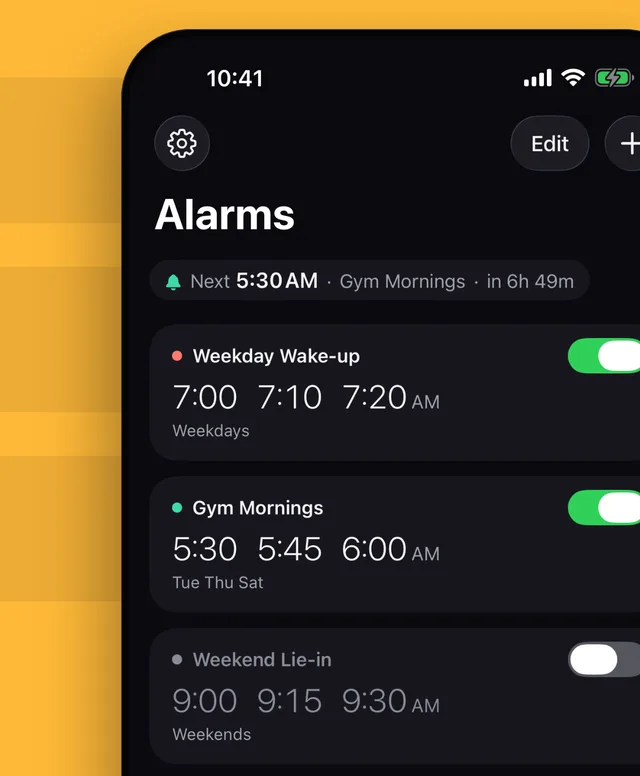
Built for mornings that need more than one alarm.
Heavy sleepers, shift workers, early gym sessions, school runs, night-shift days off. Change the routine once and the whole stack follows.
Shift the whole routine
Move the whole stack earlier or later by a few minutes. You see a preview before you apply it.
Skip tomorrow's ring
Skip next: miss tomorrow's wake-up, keep every day after it.
Up already?
Tap I'm up once you're awake and the rest of today's alarms in that stack are skipped.
Hear a test ring
After your first stack, Wakestack offers a 10-second test ring so you can hear it work before tomorrow morning.
On iPhone and iPad
Dark design. Follows your 12 or 24-hour time setting. Works with Dynamic Type and VoiceOver.
No account. No data collected.
- Your alarms stay on your device.The app sends nothing to us or to anyone else.
- No analytics, tracking or advertising.No account and no sign-up.
- One permission: alarms.If you turn it off, the app warns you instead of pretending your alarms are set. Read the Privacy Policy.
Free. No ads.
- Stacks of alarms, each with its own days
- Skip next, shift times and I'm up
- A test ring before your first morning
iPhone and iPad